
Start With a Goal, Not a Question
How we built a system that proactively improves how businesses run.

Josh Chang
Founding Engineer
Until recently, almost everything our customers did in Sapien started with a question. Someone would ask why margin dropped or which customers were ordering less, and our AI would work through their data to find the answer in minutes.
That works well when you know what to ask. But your business has far more questions worth asking than anyone on your team has time for. Margin can slip in many places at once, across products, customers, plants, and suppliers, and the change that matters often stands out only after you've looked at all of them. So even your most experienced people end up checking the few places they already suspect.
And when one of those checks does turn something up, the answer is only the start. Your team still has to decide what to change, make the change, and come back a few weeks or months later to see whether it helped. When the week gets busy, those steps are the first to slip: a good idea never gets acted on, or a change gets made and no one checks whether it paid off.
We built Proactive agents to look across your whole business, from products and customers to plants and suppliers, not just a few corners of it. You give an agent a goal, such as improving margin, reducing excess inventory, or lowering shipping cost. It keeps working as your data changes and brings you only what deserves your attention: a finding, a specific change to make, or a decision it needs from you. The agent sends each change it recommends straight to the person who can make it and follows up with them until it's done, so nothing depends on someone remembering. Once the change is made, the agent checks whether it worked.
Starting from how your business runs
A recommendation is only useful if it fits how your business actually runs. Raising prices looks like an easy win until you remember the customers on fixed-price contracts. Trimming inventory looks sensible until you remember the unreliable supplier, or the service commitment that depends on that stock.
So every agent starts from the Company Engine, the same model of your business behind every answer in Sapien, which we build with each customer during Company Calibration. It records how you calculate margin, which costs belong to which products, and which levers you can realistically pull. When records don't line up, it tries other ways of matching them before calling anything missing, and when two sources disagree, it tells you rather than quietly choosing one.
One goal, from beginning to end
Consider an operations lead who has seen shipping cost creep up for a few months. They want it back down without slowing deliveries, but tracing the increase across every lane, carrier, and type of charge would take days they don't have.
Setting the goal
They describe the goal in plain language, along with a spending cap and the delivery commitments that can't slip. They don't need to know which numbers matter or what might be behind the increase; working that out is the agent's job. The agent never invents targets of its own, and only you can change the ones you set.
Sapien suggests goals as well. When it spots a part of the business that your current agents leave uncovered, it proposes a new one, with the reason and how often it would check, and you accept or decline it. In the example below, it suggests matching specialist capacity to backlog, checked weekly, because none of the existing agents cover the pull between capacity and backlog. Once a goal is accepted, it joins the agents already running, each one showing whether its KPI is improving or holding steady and the action it recommends next.
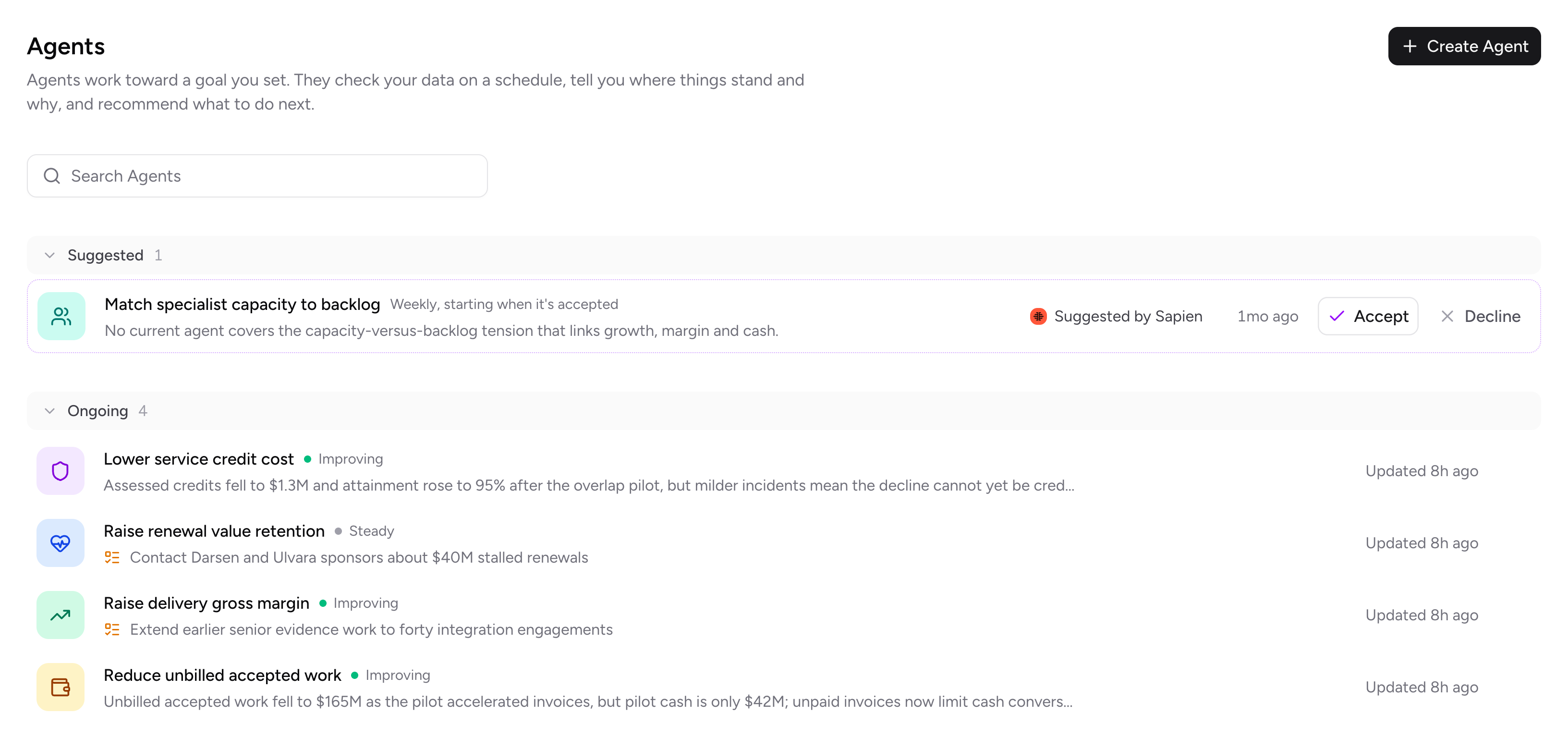
Sapien suggests Proactive agents with objectives. You can accept, edit, or decline the suggestion.
Finding the cause
The shipping agent's first run is different from the ones that follow. First, it explores the shipping data, settles on the KPIs it will track (freight cost, lanes, types of charges, and on-time delivery), and builds a deeper baseline to measure later checks against. From then on, it checks in on a schedule, daily by default, and also whenever the data changes.
Each check starts by picking out the key movements in its numbers that most deserve a look. In our example, if freight cost is up, the agent works through the likely explanations:
- Did carrier rates go up?
- Are more orders going out on expensive lanes?
- Have surcharges risen?
- Has delivery performance slipped?
It then breaks the increase down across relevant slices: account, lane, type of fee, and week; works out how much each piece contributes, and concentrates on the largest piece that someone can actually change.
Each check ends in a short report for the operations lead: the actions it recommends, the questions it still has, and the gaps it found in the data. Plenty of checks end without a recommendation, and we consider that a good result. Your team doesn't need a steady stream of things to look into always.
Sapien has a sophisticated, secure role-based access control (RBAC) system, and every agent runs inside it. Through all of these checks, the shipping agent works with the operations team's access. When the operations lead shares it with the logistics team, its access narrows on its own to the data both teams can see. Every query it runs passes through the RBAC check, with a row filter added each time, so only the rows both teams are allowed to see come back. Here that covers invoices, accounts, shipments, and delivery records, while payroll and sales quotas stay out of reach, with nothing for IT to configure.
Recommending a change
When the agent finds something worth acting on, it writes it up as a Task in Sapien: one specific proposed change or gap to fill, the reasoning behind it, the result we expect, who owns it, and when it's due. The agent routes each task to the person best placed to act on it, such as the buyer for a supplier change or the logistics manager for a carrier request. It stays in their list until it's done, and if it stalls, the agent follows up with them. Here, the task lists the affected lanes and charges and drafts a request to the carrier that keeps on-time delivery intact. You can inspect the invoices and delivery records behind every figure.
We spent a lot of time on the shape of these write-ups. This one opens with a title that says what happened, shows the surcharges by lane in a chart, explains why in a few sentences, and ends with a recommendation sized so one person can finish it.
Recommendations are bounded by what the agent can see in the data. If the data doesn't trace, Sapien will not recommend it.
You're in the driver's seat
Your team makes the final call on every Task. You can accept it, explain why it won't work, or ask the agent to walk you through its reasoning.
What you tell it sticks, because each agent is backed by its own private memory, which is how it learns from the people it works with. We keep that memory small on purpose. Every time the agent updates its memory, it keeps only what matters most. It also separately stores longer notes outside of its memory, and the agent pulls them up when a check calls for them.
Back to our example. Suppose the shipping agent also suggests moving several lanes to a cheaper carrier, and the operations lead turns it down because that carrier keeps missing delivery windows on those routes. The agent writes that reason into its memory, so later checks leave that carrier out.
Accepting a task doesn't actually change your data. In this workflow, the operations lead would send the request and update the rates which would reflect in their ERP, and the agent picks up the change on its next check.
How we make the agent trustworthy
Building this, a core driving principle we anchored on was that people act on an agent's recommendations only when they trust them. To tackle this, we developed Proactive around a few core ideas:
Every value surfaced to you comes from the current data: The agent calculates each figure from your data at the time of the check and saves it alongside the query that produced it.
Investigate, then write: The write-up Sapien produces only uses facts from its investigation. If something is missing, the agent goes back and investigates further instead of papering over the gap with a sentence that sounds right.
The agent sees only what everyone using it can see: An agent's access is the overlap of the permissions of the people it's shared with. Share it with someone new and it narrows on its own to the data all of you are allowed to see, with nothing for IT to configure. If you share an agent, or assign a task to someone with narrower access, we warn you first.
The agent reviews its own work: Before showing you anything, it rereads its findings the way a careful analyst would, looking for a bigger opportunity it may have missed or a figure that doesn't add up, and fixes what it finds.
Chat is still the right tool when you know what to ask. Proactive agents are for the questions no one has time to ask, and for everything that has to happen after the answer.